
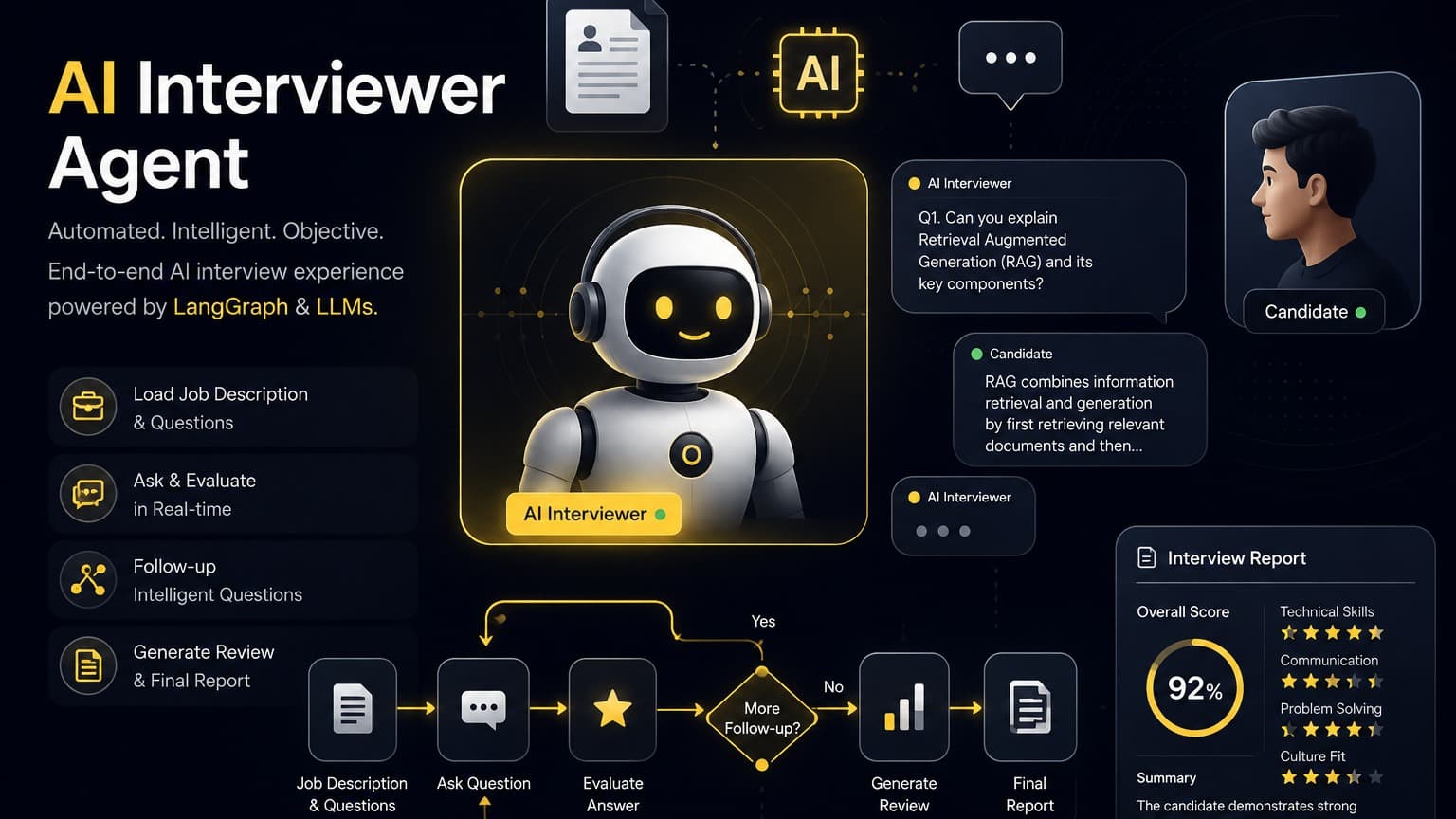
HR Interviewer Agent Overview The HR Interviewer Agent is a LangChain/LangGraph‑based AI interview system that automates the end‑to‑end hiring questionnaire workflow.
🎤 Interviewer Agent
An AI-powered technical interviewer built with LangGraph, LangChain, and Streamlit. It reads a job description and a set of interview questions from a JSON config, conducts a chat-style interview, evaluates each answer with an LLM (asking follow-ups when key concepts are missing), and finally produces a polished Markdown candidate-evaluation report.
The interview is modeled as a LangGraph state graph. Each node is a method on the Interviewer class in src/agents.py:
Node | Responsibility |
|---|---|
| Presents the next question or a queued follow-up to the candidate. |
| Sends the answer to the LLM, classifies each required keyword as |
| Grades all collected answers against the job description and required keywords. |
| Turns the review into an executive-quality Markdown report and writes |
Flow: evaluate → ask → evaluate → … → review → report
Follow-ups are limited per question by number_of_followup_chances in the config. When all questions are exhausted, the graph routes to review and then report.
The evaluation prompt also enforces a few guardrails: it declines to reveal internal company data, avoids discriminatory questions, and does not store personal data (age, gender, address, etc.).
interviewer_agent/ ├─ src/ │ ├─ app.py # Streamlit chat UI (entry point) │ └─ agents.py # LangGraph graph, Interviewer class, state + config loading ├─ data/ │ └─ job_config.json # Job description, questions, follow-up limit ├─ requirements.txt ├─ .env.example └─ report.md # Generated after an interview completessrc/agents.py — defines the JobConfig dataclass, the AgentState TypedDict, the Interviewer class (ask / evaluate / review / report logic), and build_graph() which wires the LangGraph state machine.
src/app.py — the Streamlit front end. It holds interview state in st.session_state, renders the chat, drives node_evaluate_answer on each user message, and displays / offers a download of the final report.
Python 3.9+
Access to an OpenAI-compatible chat completions endpoint (OpenAI, Azure OpenAI, or a local server such as Ollama / LM Studio)
# Create and activate a virtual environment python -m venv .venv .venv\Scripts\activate # Windows (PowerShell) # source .venv/bin/activate # macOS / Linux # Install dependencies pip install -r requirements.txtCreate a .env file in the project root. The model client in Interviewer.__init__ reads these keys via os.getenv:
Variable | Description | Default |
|---|---|---|
| Chat model to use. |
|
| Base URL of the LLM API. Set this for Azure or local providers. |
|
| API key for the LLM service. |
|
Example .env:
MODEL_NAME=gpt-4o-mini BASE_URL=https://api.openai.com/v1 API_KEY=sk-xxxxxxxxxxxxxxxxxxxx.env.example lists OPENAI_API_KEY, but the code reads MODEL_NAME, BASE_URL, and API_KEY — use the keys in the table above.streamlit run src/app.pyStreamlit opens the UI in your browser (default http://localhost:8501). Then:
Click 🚀 Start interview — the bot asks the first question.
Type an answer and press Enter. The bot evaluates it and either asks a follow-up or moves to the next question.
After the last question, it generates a review and report.
The 📄 Candidate Evaluation Report renders inline, with an ⬇️ Download report.md button. The report is also written to report.md in the working directory.
Use 🔄 Reset interview in the sidebar to start over. The sidebar also shows live progress (current question, queued follow-ups, done status).
The interview content lives in data/job_config.json:
{ "job_description": "Full text describing the role.", "questions": [ { "id": "q1", "text": "First interview question?", "required_keywords": ["keyword1", "keyword2"], "guidance": "Notes on what a good answer contains." } ], "number_of_followup_chances": 1 }Field | Purpose |
|---|---|
| Used by the reviewer to judge JD alignment. |
| Stable identifier stored with each recorded answer. |
| The question shown to the candidate. |
| Concepts the evaluator checks for; missing ones trigger a follow-up. |
| Internal notes attached to the saved answer (not shown to the candidate). |
| Max follow-ups per question before moving on. |
Different model / provider — change MODEL_NAME / BASE_URL / API_KEY, or edit Interviewer.__init__ in src/agents.py.
New graph nodes — add a node (e.g. sentiment or plagiarism checks) in build_graph() and update the routing in Interviewer.router.
Different front end — the graph logic is UI-agnostic; app.py can be swapped for FastAPI, a CLI, or another framework while reusing Interviewer and get_next_prompt.
LangGraph · LangChain · Streamlit · OpenAI-compatible LLM